Agentic Workflows: What They Are, How They Differ From RPA and Rule-Based Automation, and Where to Use Them in Your Business


Work gets stuck between systems: incomplete leads, invoices, and support requests needing interpretation. Agentic AI workflows can handle these tasks by interpreting variable inputs, selecting actions, and coordinating work across connected business systems. They let a system adapt its decisions as a task progresses, which makes validation and oversight essential parts of the design.
What are agentic workflows?
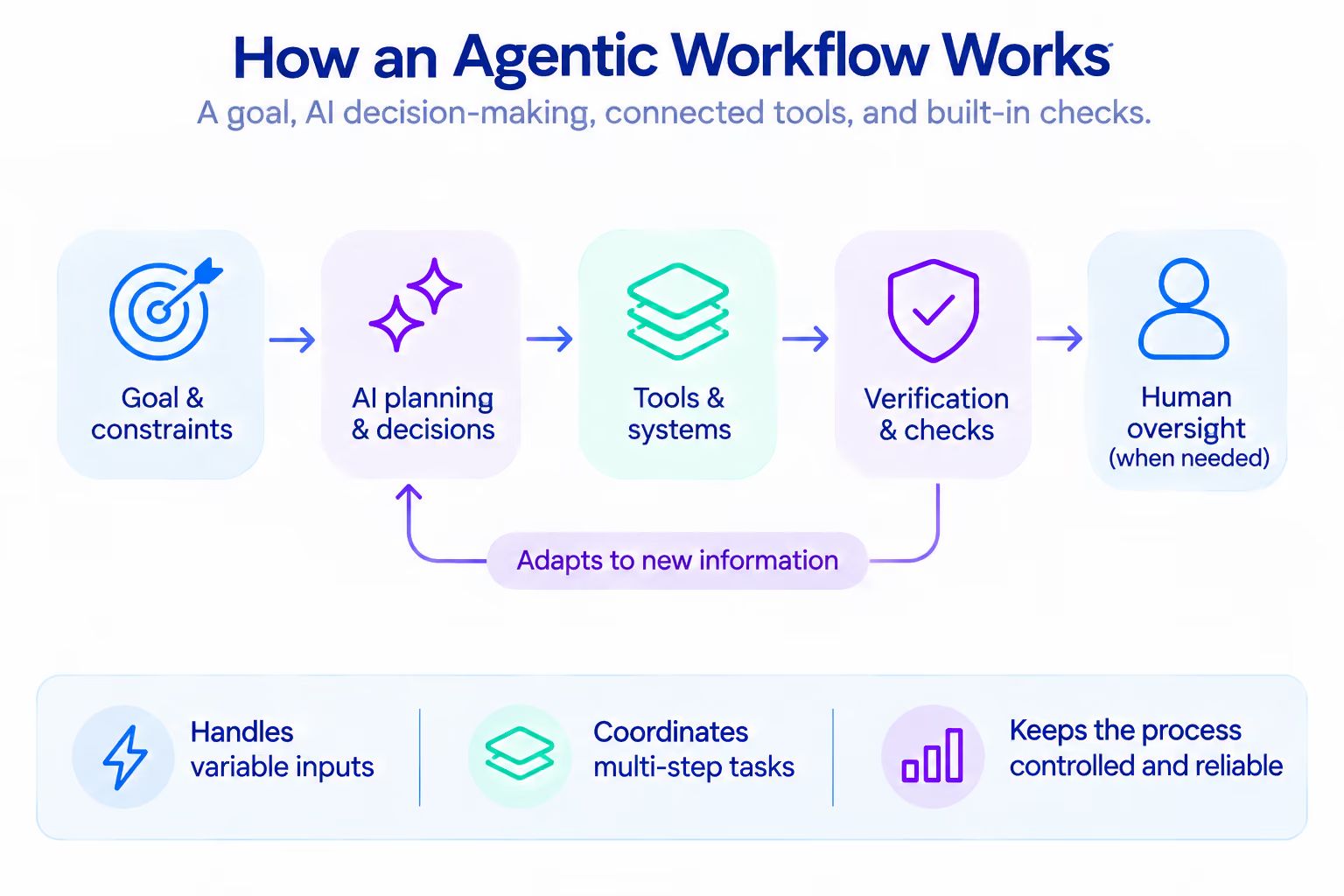
An agentic workflow uses an AI model to interpret a goal, select steps, use approved tools, and adapt to results.
An agentic workflow combines five elements:
- A goal and constraints. The business defines the intended outcome, permitted actions, limits, and conditions for escalation.
- Model-led planning. The model interprets the task and chooses from available steps. Planning may happen once or be revised as new information arrives.
- Tools. Approved functions connect the workflow to a CRM, ticketing platform, document store, database, email service, or other business system.
- Context and memory. The workflow can use information from the current task and, where appropriate, stored business context.
- Verification. The system checks outputs against business rules, source data, or a required format. It records what happened and routes uncertain or consequential cases to a person.
Keep the available toolset limited and critical business rules explicit. For more on the underlying AI agent concept, see AI agents development.
Agentic workflows vs. AI agents vs. traditional automation
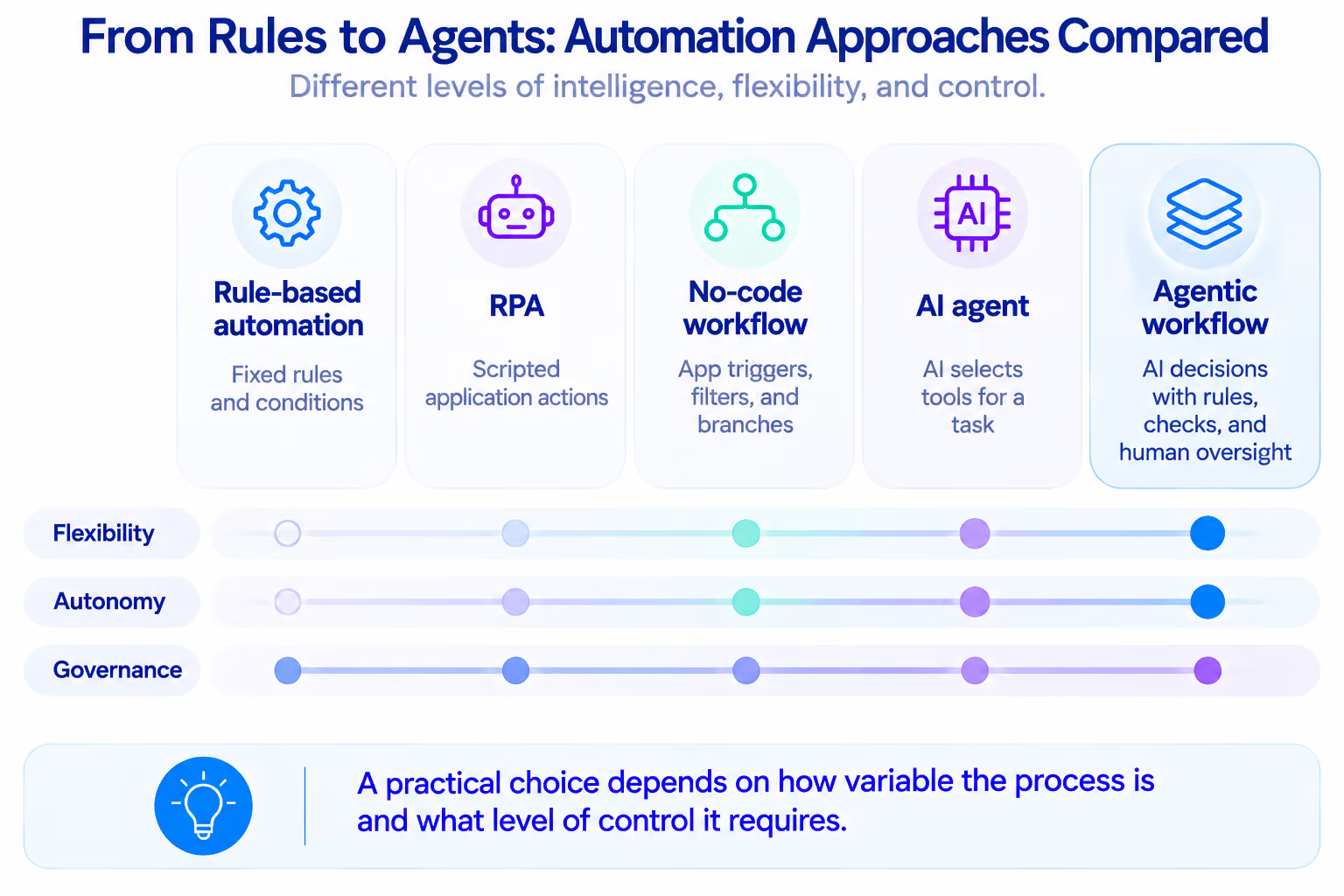
An AI agent can use tools to retrieve information and perform specific tasks, while an agentic workflow coordinates these actions with business rules, validation steps, and human oversight.
Rule-based automation follows preset conditions. RPA bots perform repetitive application actions. No-code workflows connect app triggers and actions with filters and branches.
Agentic automation and agentic process automation describe the use of AI agents to make decisions and perform tasks within automated processes. The term agentic process automation is often used for workflows that coordinate multiple steps across a wider business process.
A process can combine RPA, code, an AI agent, and human approval. Atomic Actions also provides robotic process automation services for processes where repeatable execution is the better fit.
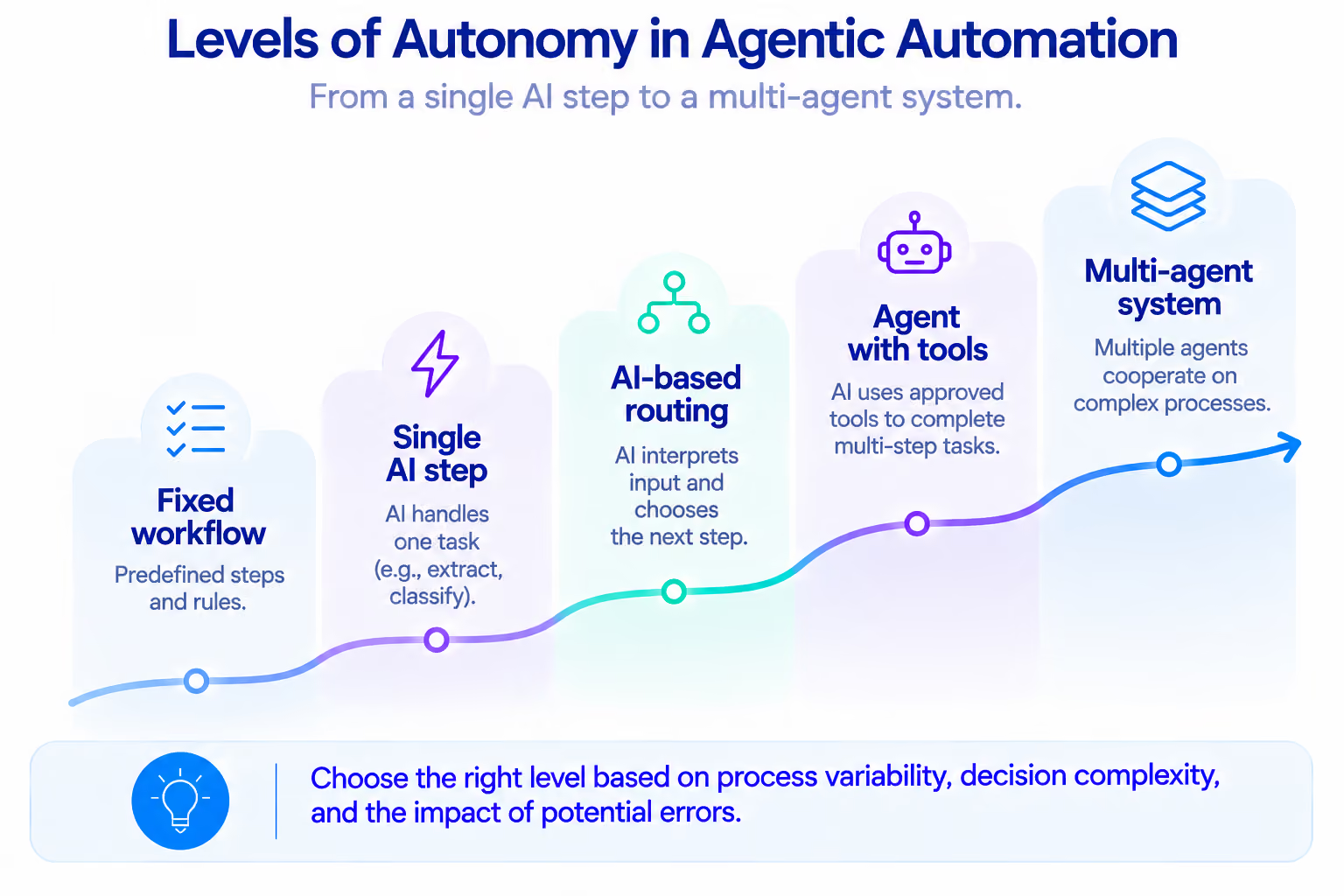
Levels of autonomy: from one AI step to multiple agents
The right level of autonomy depends on how much the process varies, what decisions it requires, and the consequences of an incorrect action.
Single AI step → AI-based routing → Agent with tools → Multi-agent system
A practical example of an AI agent handling a multi-step task comes from content production. Atomic Actions developed an agent that retrieves client context from Google Drive, searches the internet for additional information, and generates more than 15 types of marketing assets using predefined structures and multiple LLMs. The case study reports 92% faster content production and a 400% increase in client capacity. Tasks that previously took 4–6 hours per campaign asset can now be completed in under 10 minutes.
Multi-agent systems introduce additional coordination overhead and increase the risk of context loss between agents. For most SMB processes, a single agent with a limited set of tools is simpler to maintain and troubleshoot.
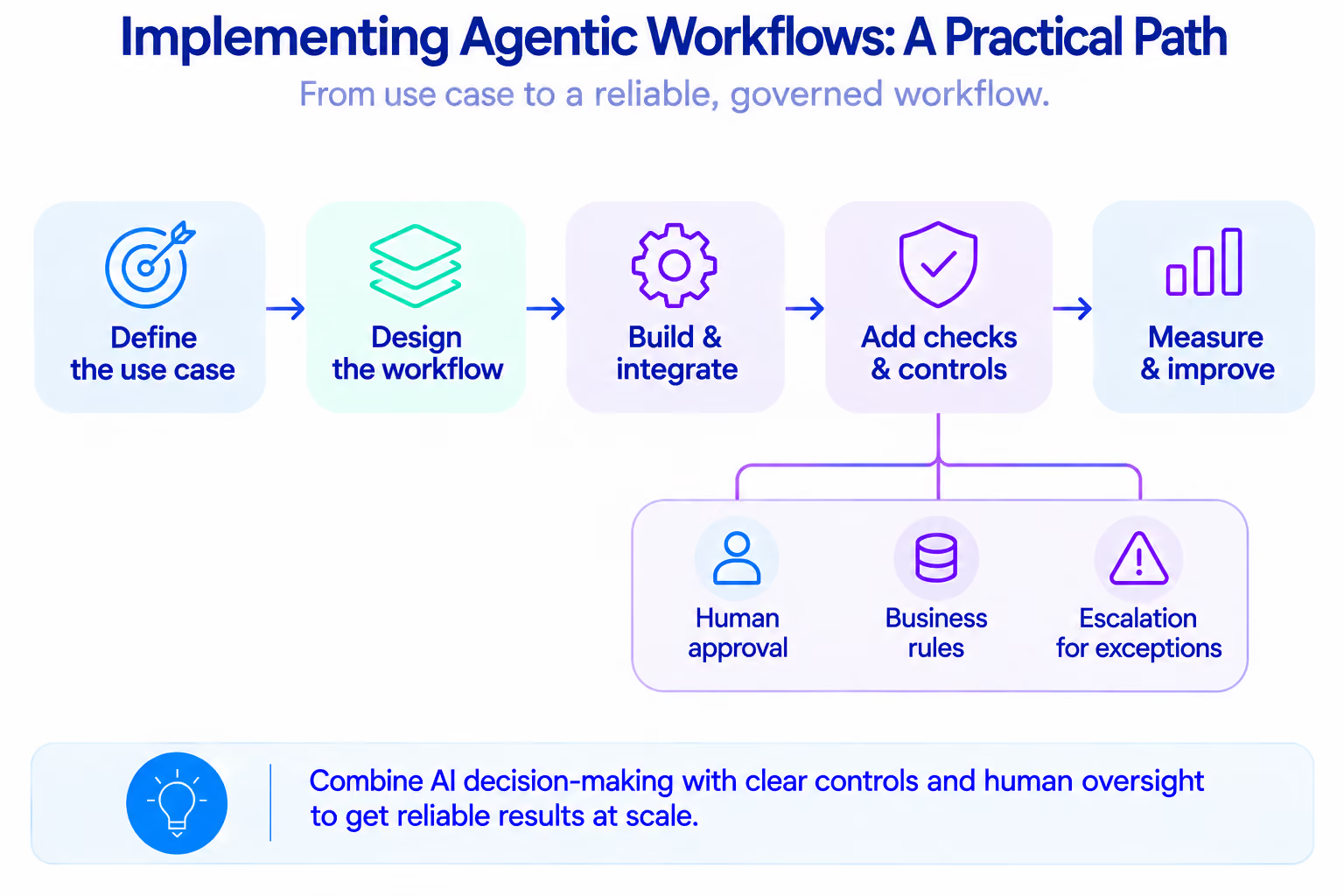
Core patterns used in agentic workflows
An agentic workflow typically starts when a request is received. The agent plans the steps, uses available tools, checks the results, and determines what to do next. Depending on the task, it may route the request to a specialist agent or workflow, which completes a specific task and returns the result. If a decision requires human judgment or approval, the workflow pauses at a checkpoint where a person can review, edit, or reject the proposed action.
- Planning: Breaks a goal into steps and identifies missing information.
- Tool use: Calls approved functions, such as CRM search or document reading.
- Reflection: Checks results against requirements or source data; use deterministic checks too.
- Routing: Classifies an item and selects a workflow or specialist; uncertain cases go to review.
- Orchestrator-workers: A coordinator delegates bounded subtasks and combines results.
- Human checkpoints: A person approves consequential actions, including payments or account changes.
Model decisions should handle variable inputs and situations that require interpretation, while fixed business rules should govern predictable actions such as approval thresholds, required fields, and access permissions.
Agentic workflow examples for SMB operations
Agentic workflows are most useful when processes involve variable inputs, require context-based decisions, and follow a defined sequence of actions.
Document processing can also combine AI-based extraction with predictable accounting rules. For X-Cel Technologies, Atomic Actions connected Parsio, the ChatGPT API, and QuickBooks to extract information from packing slips and generate invoices. Invoice creation became 15 times faster, and the team processed three times more invoices with the same resources. The system validated the extracted data and created invoices automatically. The original PDFs were also retained for traceability. Read the X-Cel invoice automation case study for the full implementation details.
For document-heavy processes involving invoices, forms, and other business records, explore data extraction and recognition services and this example of automated data entry with AI parsing.
Client onboarding shows how connected workflows can coordinate multiple operational steps. For Be Known, Atomic Actions built a Make.com automation connecting seven platforms: JotForm, GoHighLevel, QuickBooks, ClickUp, Slack, Google Workspace, and Toggl. A single form submission triggers more than 10 automated steps. These include creating client records, generating documents, scheduling reminders, and sending notifications. The case study reports 95% faster onboarding, more than 40 hours reclaimed per month, and $18,000 in annual savings. This is an example of workflow automation that could be extended with an agentic layer when incoming information requires interpretation or exception handling. See the automated client onboarding case study.
When teams need a centralized view of workflow status, exceptions, and performance, custom apps and reporting dashboards can bring operational information together.
When an agentic workflow is unnecessary
When inputs are structured and decisions follow stable rules, conventional automation is usually sufficient. Conventional automation is likely sufficient when most of these conditions apply.
- The process follows the same steps for nearly every case.
- Inputs arrive in a consistent, structured format.
- Decisions can be expressed as clear conditions and thresholds.
- The required actions are known in advance.
- Exceptions are rare and can be sent to a person.
- An existing integration, scheduled job, or RPA bot can perform the task.
- The cost of a wrong interpretation would outweigh the value of flexibility.
If most of these conditions apply, rule-based automation, no-code workflows, or RPA will likely be sufficient. If inputs are unstructured or decisions depend on context, add an AI step only where interpretation is needed.
Mapping a changing process before automating it helps identify unnecessary steps and unresolved operational issues. See operational discovery before automation for why that assessment matters.
How businesses build agentic workflows
Choose a platform or framework based on workflow complexity, required integrations, control requirements, and the team's capacity to maintain it.
In a hybrid setup, for example, an agent can classify an incoming request and select the next action, while predefined rules validate the selected route and restrict which records the workflow can change.
n8n, Make, and Zapier add AI to visual app workflows. Their documentation describes agent or AI steps that can use connected tools.
LangGraph supports stateful orchestration; CrewAI Flows manage state and orchestrate crews of agents; the OpenAI Agents SDK includes tools, handoffs, guardrails, and tracing. When building agentic AI workflows, teams need to define how agents share context, access connected systems, and hand off tasks that require human review.
The Model Context Protocol (MCP) standardizes connections to external tools. Access and approval rules remain the implementer's responsibility.
Before launch, settle four design questions.
- Data and access: Identify the systems of record, data quality issues, user roles, and the minimum permissions required for each tool.
- State and context: Decide what information the workflow needs during a run, what may be retained between runs, and when stored context should expire.
- Logging and evaluation: Log the information needed to understand and audit each run, including tool calls, errors, and approval decisions. Test representative cases and edge cases before changing the live process.
- Ownership and maintenance: Assign responsibility for credentials, platform updates, failed runs, model changes, and process changes.
Risks, guardrails, and human oversight
A model can misread instructions, invent details, choose the wrong tool, or repeat costly calls. Poorly controlled agent loops can also repeat the same action, revisit completed steps, or continue calling tools without making meaningful progress. Broad permissions can expose more business data and allow unintended changes across connected systems.
External content, including emails, uploaded documents, and retrieved web pages, should be treated as untrusted input. Design the workflow so this content cannot change the agent's instructions or expand its permissions. OWASP identifies prompt injection and excessive agency as key risks.
Use these controls to limit the risks:
- Give each agent only the tools and data its task requires. Separate read access from write access.
- Validate tool arguments and outputs against schemas, business rules, and source records.
- Set limits on steps, retries, execution time, and model spend. Stop and escalate when a limit is reached.
- Require approval before payments, refunds, supplier orders, account changes, contract commitments, or other consequential actions.
- Keep an audit trail of the input, decision, tool call, result, and person who approved a sensitive action.
- Test prompt injection and unexpected input formats, and prevent retrieved content from overriding system instructions.
- Provide a fallback path so an employee can take over when a connected service fails or the workflow cannot process an input. For example, the Be Known onboarding automation uses error notifications and fallback flows to flag records that cannot be processed automatically.
This human-in-the-loop approach keeps people involved in decisions that require judgment or carry significant consequences. OpenAI's guardrail guidance covers input, output, and tool checks; MCP recommends tool visibility and denial controls.
See designing workflows for edge cases for practical approaches to handling exceptions and keeping business processes reliable.
A practical implementation plan and ROI model
Start with an owned, measurable process, accessible data, and manageable failure costs. Roll out the workflow in four stages.
- Audit the process. Map how the process works today, including its main steps, decision points, and handoffs between employees and systems. Record baseline volumes, cycle times, rework, and current operating costs. Confirm that the process is stable enough to improve.
- Choose one bounded pilot. Select a task with variable inputs and clear success criteria, such as classifying incoming requests or preparing invoice records for review. Define the tools the agent can use and the actions it cannot take.
- Test and measure. Run the workflow against historical examples and a controlled live sample. Compare its results with the current process. Track decision accuracy, human corrections, and failed tool calls. Also monitor execution time and model usage to understand the workflow's operating cost.
- Expand in stages. Fix recurring failure modes, document ownership, and add the next workflow only when the pilot performs consistently. Reassess permissions and monitoring as the scope grows.
A useful ROI calculation includes both the measurable gains from automation and the costs of implementing, operating, and reviewing the workflow. Business optimization and analytics can help teams assess operational performance and identify where process improvements are needed.
Annual net benefit = Total measurable annual gains − Total annual operating costs
First-year ROI (%) = (Annual net benefit − Initial implementation cost) ÷ (Initial implementation cost + Total annual operating costs) × 100
Count released capacity financially only when it reduces overtime or hiring, or supports revenue-generating work. Include implementation, integrations, model fees, monitoring, and human review in the cost calculation. For a more detailed breakdown of the financial assessment, see this guide to calculating automation ROI.
Evaluate the pilot against six measures.
- Cycle time: How long it takes to complete the process.
- Straight-through completion rate: The share of cases completed without manual intervention.
- Exception and correction rates: How often a person must fix or reroute the work.
- Accuracy: Whether extracted data, classifications, and final outputs meet agreed standards.
- Cost per completed case: Total workflow cost divided by successfully completed cases.
- Service or business outcome: For example, response time, onboarding completion, or qualified-lead rate.
Agentic workflows can also help teams make better operational decisions by analyzing business data and preparing insights for review. Learn how AI helps operations teams make better decisions. As businesses connect more workflows, they may need a broader system to manage data, responsibilities, and day-to-day operations. The article on business operating systems after workflow automation explores this progression.
Where to start
Start with a process where employees regularly interpret incoming information and decide what should happen next. Lead qualification, support triage, document review, and client onboarding are potential candidates. Use the metrics outlined in the ROI section to compare the pilot with the existing process.
Review the pilot results before expanding. The workflow should demonstrate measurable operational value, and the team should be able to maintain it over time.
Atomic Actions has delivered more than 150 AI agents and automations across 20 industries. This experience spans different business processes and helps identify where agentic workflows are a suitable solution.
Looking to introduce AI into your business processes? Talk to Atomic Actions about identifying suitable use cases and building an automation strategy around your operational needs.
FAQ
Are agentic workflows the same as AI agents?
An AI agent performs tasks toward a goal using available tools and context. An agentic workflow organizes agent actions into a broader business process, combining integrations, predefined rules, validation steps, and human oversight.
How are agentic workflows different from RPA?
RPA executes predefined software actions. An AI agent interprets context and chooses permitted steps. An agentic workflow can combine both approaches, using RPA for predictable tasks and AI agents for decisions that require interpretation, with human review for exceptions.
What is the difference between agentic automation and agentic process automation?
The terms are closely related and often overlap. Both describe the use of AI agents to make decisions and perform actions within automated business processes. Some vendors use agentic automation to describe the coordination of AI agents, robots, and people across end-to-end processes. Check how a specific provider defines the term.
Do small businesses need a multi-agent system?
Usually not. A single agent or an AI step within an existing workflow can handle many business tasks. Multi-agent systems make sense when a process requires several specialized roles or parallel tasks, but they also increase coordination and operating costs.
Can agentic workflows run without human approval?
Yes, for low-risk tasks with clearly defined permissions and execution limits. Actions involving payments, contracts, refunds, or account changes should include human approval before execution.
Which tools should a business use?
n8n, Make, and Zapier are suitable for visual workflows that connect existing business applications. LangGraph, CrewAI, and the OpenAI Agents SDK offer more control over custom agent logic and orchestration. The choice depends on integration requirements, workflow complexity, access controls, and available maintenance resources.
You might also like