Automation ROI: How to Calculate the Real Cost and Payback


Automation is often sold as a simple equation: spend money on technology, reduce manual work, and save money. Real automation economics are more complicated.
The cost of automation is not limited to software licenses or development hours. The ROI of automation is not limited to the salary cost of the people whose repetitive tasks are automated. A well-designed automation can reduce errors, increase capacity, accelerate revenue-generating processes, improve visibility, and allow a business to grow without increasing headcount at the same rate.
There is another side to the equation, too: the cost of inaction. Manual processes may look inexpensive because their costs are distributed across salaries, overtime, corrections, delays, duplicated work, and management time. But once those costs are measured, the business case for automation can look very different. This is why automation should be evaluated as an economic decision, not simply a technology investment.
Why Automation ROI Often Feels Fuzzy
For most companies, the visible costs of automation are relatively easy to identify:
- software subscriptions;
- implementation and integration;
- development;
- maintenance;
- employee training.
The cost of the existing manual process is much harder to see. A team may spend a few minutes copying information between systems, checking documents, updating spreadsheets, sending follow-ups, or correcting errors. None of those tasks looks particularly expensive on its own. Multiply them across hundreds or thousands of transactions, however, and the economics change.
.avif)
Research into knowledge work illustrates how much capacity can disappear into administrative coordination. Asana's Anatomy of Work research found that knowledge workers spent 58% of their workday on "work about work" — activities such as communicating about tasks, searching for information, switching between tools, and coordinating work rather than performing the skilled work they were hired to do.
McKinsey's research on robotic process automation found first-year ROI ranging from 30% to 200% across the 16 case studies it examined. Importantly, the research also emphasizes that labor savings alone do not capture the full value of automation. Better service, compliance, scalability, and employee capacity can be equally important benefits.
So the first step is to stop asking: "How much does this automation cost?" And start asking: "How much does this process cost us today, and what will that cost look like three years from now?"
The Full Cost of an Automation Project
A realistic business case should use total cost of ownership (TCO) rather than the initial project price. For a three-year view, that typically includes five categories.
.avif)
Discovery and Process Design
Before anything can be automated, the workflow has to be understood. That means mapping:
- where data enters the process;
- which systems are involved;
- which decisions are rule-based;
- where humans need to intervene;
- what happens when something goes wrong;
- and what the desired outcome actually is.
This stage is easy to underestimate because it may not produce a visible software feature. In practice, however, poor process design is one of the fastest ways to build an automation that technically works but does not create meaningful business value.
This is also where business process optimization begins. Automation works best when the underlying process is understood and improved before technology is applied to it.
Platforms and Infrastructure
Depending on the project, this can include:
- automation platforms such as Make, Zapier, or n8n;
- AI model usage;
- APIs;
- databases;
- cloud hosting;
- OCR and document-processing services;
- monitoring and logging tools.
These recurring costs matter because an automation is not economically attractive if its operating cost grows faster than the value it creates.
Implementation and Integration
Connecting systems is usually where the complexity lives. A workflow may need to connect a CRM, accounting system, email inbox, document storage, spreadsheets, ERP, payment system, or internal database.
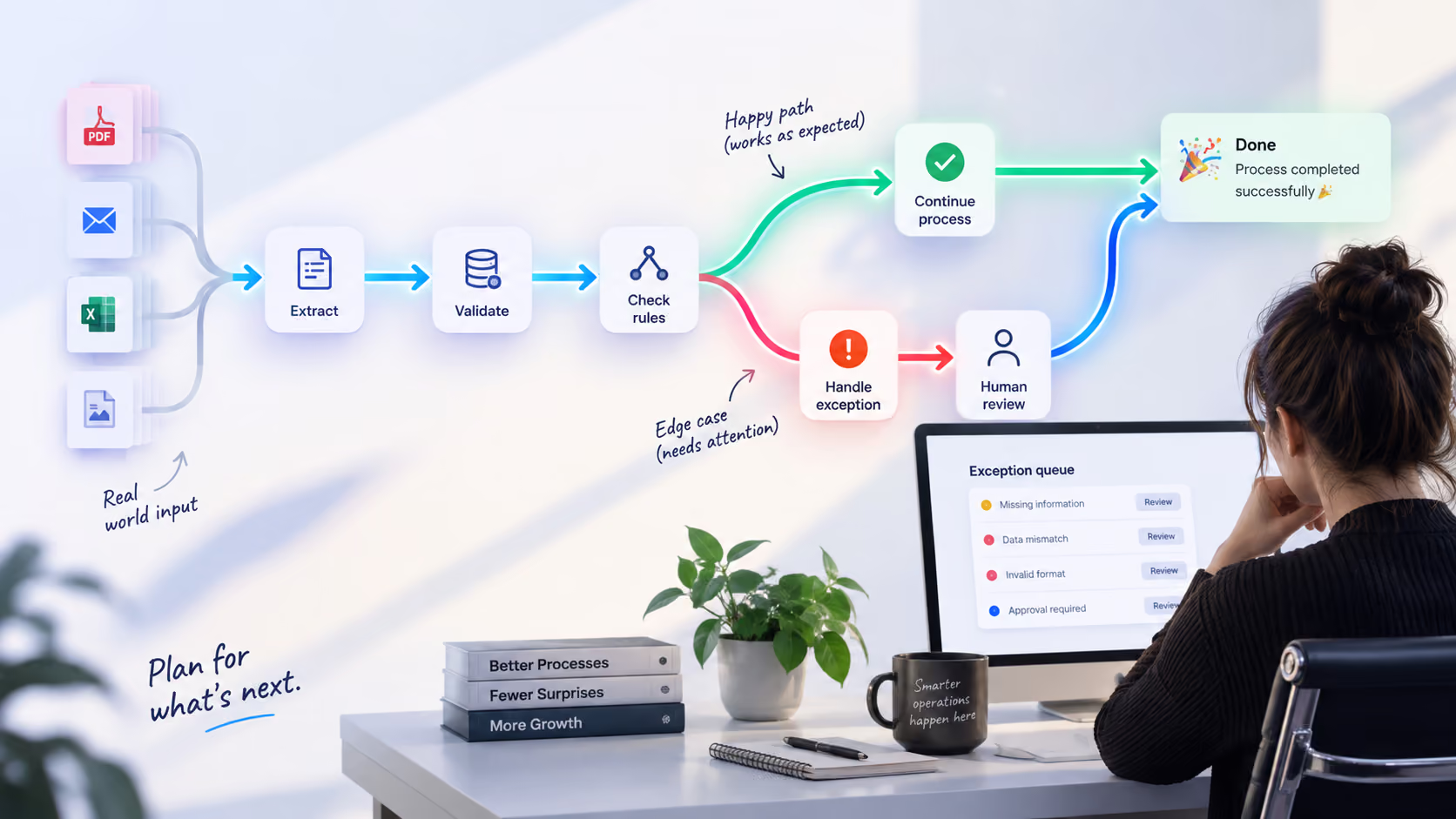
The goal is not simply to make two systems exchange data once. A production automation needs to handle exceptions, missing information, duplicate records, failed API calls, and changes in the underlying systems.
This is one reason Atomic Actions approaches automation as an integrated business workflow rather than a collection of isolated shortcuts. Its work includes CRM integrations, AI-powered document processing, dashboards, and custom operating systems that connect multiple business functions.
Change Management and Training
Even a technically excellent automation can fail economically if employees do not trust it or understand how it works. Teams may need:
- documentation;
- training;
- new approval procedures;
- exception-handling rules;
- ownership of the automated workflow.
The objective is not to eliminate humans from the process entirely. It is to move human attention toward the parts of the process where judgment actually adds value.
Support and Optimization
Automation is an ongoing capability, not a one-time installation, requiring maintenance and optimization as APIs, business rules, tools, volumes, and exceptions evolve. That means a realistic TCO model should include ongoing monitoring, maintenance, troubleshooting, and incremental improvements. In other words, process optimization continues after deployment. The best automation projects evolve as the business evolves.
Where the ROI Actually Comes From
The biggest mistake in automation business cases is treating labor savings as the only source of ROI. There are at least four major business process automation benefits to consider.
.avif)
Direct Labor Savings
The most obvious benefit is the reduction in repetitive manual work.
For example, if employees spend 100 hours per month processing invoices, and automation eliminates 70% of that work, the business has effectively recovered 70 hours every month. But the calculation should use fully loaded labor costs, not just base salary.
That means considering salary, benefits, taxes, management overhead, equipment, and other employment costs. A simple starting formula is:
Annual manual cost = Hours per week × Fully loaded hourly cost × 52
This gives the business a baseline against which automation can be compared.
Error Reduction and Data Quality
Manual work creates another cost: mistakes. Double entry, copy-paste errors, missing documents, incorrect classifications, and outdated spreadsheets can all create downstream work. Automation does not automatically guarantee perfect data, particularly when AI is involved. But a properly designed workflow can reduce unnecessary manual handling, validate inputs, create consistent data flows, and make exceptions visible.
That turns quality from something employees have to remember to maintain into something the process itself helps enforce. The resulting cost savings are not always visible as a separate line item. They can appear as less rework, fewer corrections, fewer delays, and lower operational risk.
Capacity and Throughput
Automation can also increase the amount of work a team can handle without proportionally increasing headcount. This is one of the most important workflow automation benefits because capacity gains can become more valuable as a business grows.
Consider a simple example: if a process takes 15 minutes per transaction and a company handles 1,000 transactions per month, that represents 250 hours of manual work. Reducing processing time to one minute changes the economics dramatically.
Atomic Actions saw exactly this effect in an invoice automation project for X-Cel Technologies. The automated workflow reduced invoice creation to approximately one minute, making it 15× faster and eliminating manual data entry. The important economic benefit here is additional capacity without proportional additional labor.
Revenue and Growth
Automation can create value even when it does not directly reduce headcount. Faster lead response, quicker onboarding, better follow-up, fewer billing delays, and better operational visibility can all contribute to revenue growth and a more scalable operating model.
Measuring ROI purely through hours saved would therefore miss a significant part of the value. This is why automation benefits should be tied to business metrics such as revenue, conversion rates, customer acquisition costs, capacity, and operational efficiency, not measured only in hours saved.
A Practical Framework for Pricing Manual Work
Before calculating automation ROI, put an economic value on the existing process. Start with the basic formula:
Annual manual cost = Hours per week × Fully loaded hourly cost × 52
Then make the calculation more realistic by accounting for rework and error correction, overtime, management time, delays and missed deadlines, customer-service impact, compliance risk, and the opportunity cost of using employee time on manual work. The last category is particularly important. A process that takes an employee four hours every week does not necessarily cost only four hours of salary. Those four hours may prevent the employee from doing higher-value work.
Asana's research found that knowledge workers spend a substantial portion of their time on "work about work," including coordination, searching for information, and managing work. In its 2022 U.S. research, the figure was 58% of the workday.
That means the economic question can be: "What higher-value work could these employees do if this process disappeared?"
That distinction matters because productivity loss can be more expensive than the visible labor cost of a manual workflow.
From Manual Cost to an Automation Business Case
Once the status quo has been priced, the business case can be reduced to three core numbers.
Annual Savings
Estimate how much of the existing process the automation can reliably handle. For example:
- current annual manual cost: $60,000;
- automation coverage: 80%;
- estimated direct labor savings: $48,000 per year.
Then add measurable secondary savings, such as reduced rework or lower error-related costs. Be conservative. A business case based on 100% automation coverage may look impressive on paper but become difficult to defend once exceptions and human review are introduced.
Break-Even Period
A simple payback calculation is:
Payback period = Total automation investment ÷ Monthly net savings
If an automation costs $20,000 to build and operate in its first year and generates $5,000 in monthly savings, the simple payback period is four months. Payback periods vary considerably depending on complexity, implementation model, process volume, and the amount of human intervention required. McKinsey's research found potential first-year RPA ROI ranging from 30% to 200%, showing how different automation opportunities can produce very different economics.
Three-Year ROI
A three-year view is often more useful than a first-year calculation. The first year may include:
- discovery;
- implementation;
- training;
- integration;
- process redesign;
- adoption costs.
Once the system is stable, the economics can improve because the initial investment has already been made while transaction volume continues to grow. This is particularly important for automation because the marginal cost of processing additional work can be much lower than the cost of adding equivalent manual capacity.
Why Cost-Benefit Analysis Should Include the Cost of Inaction
A proper cost benefit analysis should compare the full cost of automation with the full cost of continuing the existing process. Choosing not to automate is still a financial decision.
If a company spends $10,000 per month on a manual process, delaying automation by one year does not mean the business saved the $20,000 or $30,000 that the automation project would have cost. It means the company spent another $120,000 maintaining the existing process. And that is before considering growth. If transaction volume increases by 30%, the manual cost may increase with it. If the business needs to hire additional people to absorb the workload, the cost rises again.
The same problem appears with employee capacity. If skilled employees spend their time copying information between systems, checking spreadsheets, or chasing approvals, the business is paying skilled people to perform low-value work. That is why "doing nothing" should be modeled as an alternative scenario, not treated as a zero-cost baseline.
The Hidden Cost of Doing Nothing
The cost of inaction is one of the most overlooked variables in an automation business case. Consider a simplified example.
A company spends:
- $8,000 per month on manual administrative work;
- $1,500 per month correcting errors and reworking tasks;
- $1,000 per month in management time and operational delays.
The real monthly cost is therefore $10,500. The annual cost is:
$10,500 × 12 = $126,000
Suppose automation costs $35,000 to implement and operate during the first year and reduces the relevant costs by 70%. The expected annual savings would be approximately:
$126,000 × 70% = $88,200
That produces a simple payback period of roughly five months. More importantly, waiting another 12 months has an economic cost of approximately $126,000 before accounting for business growth.
This is why a project that initially looks like a $35,000 expense can actually be a much smaller number when compared with the cost of continuing the existing process. The cost of inaction is therefore not theoretical. It is the accumulated cost of inefficiency, delay, errors, and lost capacity.
Cost Reduction Is Not the Same as Cutting Headcount
One of the misconceptions surrounding automation is that its economic value comes primarily from reducing the number of employees required. In many cases, the better objective is operational cost reduction without proportional headcount reduction.
A company may use automation to absorb more transactions with the same team, shorten response times, improve data quality, or reduce administrative workload. This is a more sustainable approach to cost reduction strategies because it focuses on improving the economics of the process itself. The value is a more efficient operating model.
Real-World Automation Economics
The most useful way to evaluate automation is to look at actual before-and-after numbers. Atomic Actions' case studies show several different ways automation can create measurable value across business process improvement, operational efficiency, and productivity.
Client Onboarding: $18,000 Saved per Year
For Be Known, client onboarding previously required manual work across forms, spreadsheets, documents, calendars, CRM, accounting, and project-management tools. Atomic Actions connected the workflow across multiple platforms.
The result:
- onboarding reduced from days to under 15 minutes;
- 95% faster onboarding;
- 40+ hours reclaimed per month;
- approximately $18,000 saved per year;
- more capacity to support new clients without equivalent administrative overhead.
These are measurable efficiency gains rather than theoretical productivity claims. Atomic Actions currently highlights this project as one of its automation case studies.
Paper-Based Operations: 30% Lower Operational Costs
For Consumer Direct Windows & Doors, lead intake, scheduling, invoicing, certificates, and reporting depended on disconnected tools and manual data entry. After automation:
- manual data entry fell by 90%+;
- lead processing dropped from approximately 15 minutes to under one minute;
- operational costs fell by 30%;
- administrative staff reclaimed 15+ hours per week;
- marketing reporting effort fell by 90%.
The project demonstrates how process improvement can create both cost savings and productivity improvement at the same time.
How to Build an Automation Business Case
A practical automation assessment can follow five steps.
Step 1: Choose the Right Process
The best candidates are usually processes that:
- happen frequently;
- follow predictable steps;
- involve multiple systems;
- rely heavily on copy-paste or manual data entry;
- create measurable errors or delays;
- directly affect revenue, cost, or risk.
Examples include processes such as invoicing, lead intake, client onboarding, reporting, document processing, CRM synchronization, production scheduling, automated tenant communication and maintenance routing, and compliance workflows.
Not every process should be automated. If a process is constantly changing, poorly defined, or requires significant human judgment at every step, redesigning it may be more valuable than automating it immediately. This is where process optimization and business process optimization should come before implementation.
Step 2: Quantify the Current State
Measure:
- transactions per month;
- minutes per transaction;
- employees involved;
- fully loaded hourly cost;
- error rate;
- rework time;
- delays;
- management involvement.
Do not rely only on what managers think the process takes. Talk to the people actually doing the work.
Step 3: Estimate Realistic Automation Coverage
Ask what percentage of the process can be automated reliably.
A realistic model might look like:
- 70% automated;
- 20% automated with human review;
- 10% requiring manual handling.
That is often more useful than promising 100% automation.
Step 4: Calculate Payback and Longer-Term ROI
Model at least:
- first-year investment;
- monthly operating cost;
- monthly savings;
- payback period;
- three-year ROI.
Then run a conservative scenario.
- What happens if automation handles only 50% instead of 80%?
- What happens if transaction volume falls?
- What happens if API or AI costs increase?
If the business case still works under less favorable assumptions, the project is much easier to justify. This is the point at which project ROI should be evaluated alongside operational metrics, rather than in isolation.
Step 5: Add the Cost of Delay
Finally, calculate what happens if the project is postponed. For example:
Monthly cost of the manual process × months of delay = cost of inaction
Then add the potential costs of additional hires, lost capacity, delayed revenue, continued errors, customer churn, and management overhead. This is often the number that changes the conversation.
Automation as a Business Efficiency Strategy
Automation is most valuable when it becomes part of a broader business efficiency strategy. The goal is not to automate every task. It is to identify where repetitive work, disconnected systems, and manual handoffs are limiting the company's operational efficiency. That means looking at the entire workflow:
Data enters → work is processed → decisions are made → information moves between systems → customers are served → results are reported.
- Any unnecessary handoff can create friction.
- Any repeated manual step can create productivity loss.
- Any disconnected system can create duplicated data.
- And any delay can create an opportunity cost.
The strongest automation projects combine process optimization, business process improvement, and automation rather than treating automation as a standalone technology purchase.
Automation Should Be Evaluated Like a Business Investment
The strongest automation business cases do not promise that technology will magically transform a company. They show a measurable relationship between:
Current process → current cost → automation investment → measurable improvement → financial return
The initial project price is only one part of the equation. A $20,000 automation that saves $50,000 per year can be inexpensive. A $5,000 automation that saves almost nothing can be expensive. And a $50,000 project that prevents the business from spending another $200,000 over the next two years on manual operations may be cheaper than doing nothing. The key is to measure the whole system. A proper cost benefit analysis should consider both sides of the equation:
Cost of automation + ongoing operating costs
versus
Manual labor + errors + delays + productivity loss + cost of inaction
When these numbers are visible, automation stops looking like a speculative technology project and becomes a business investment with measurable ROI, cost savings, operational efficiency, and long-term business efficiency gains.
At Atomic Actions, the focus is on identifying workflows where those economics can be measured and improved. From AI agents and workflow automation to CRM integrations, dashboards, and digital control centers, the team helps businesses reduce manual work, improve operational efficiency, increase capacity, and connect systems into more effective workflows. Atomic Actions can help you identify where manual processes are costing your business the most, calculate the potential ROI of automation, and prioritize the workflows worth automating first.
Book an automation strategy session with Atomic Actions and turn your biggest operational bottlenecks into measurable savings and efficiency gains.
.avif)
.png)
.avif)