Small Business Automation: RPA, AI & CRM Guide

.avif)
Small business automation uses software, integrations, robotic process automation (RPA), and AI to remove repetitive work and move business data reliably between systems. For owners comparing automation for small business, the aim is practical: grow without adding staff for every new task. Small business automation works best when it removes repetitive work and keeps data reliable.
For many owners, the problem is operational debt: the accumulated cost of workarounds, duplicate entry, delays, and undocumented processes. This is why small business task automation should start with the work that consumes time or puts revenue at risk. Leads sit unanswered, quotes take too long, invoices are re-entered manually, customer details live in three spreadsheets, and the team spends its best hours on copy-paste work. Automation addresses this by turning fragmented manual steps into connected workflows.
Atomic Actions connects CRM, finance, operations, and reporting tools so data moves reliably between systems. Its AI agents development work covers tasks such as invoice processing, order tracking, client requests, and report generation.
Why Small Businesses Automate Now
Small businesses accumulate inefficiencies: missed forms, copied invoices, and forgotten follow-ups. Automation matters because AI can summarize emails, extract document data, draft replies, and route requests.
Start at the task or process level, then build toward a central hub. A Central Hub establishes one source of truth for customers, jobs, and performance data. See the Central Hub approach for growing SMBs.
.png)
Start With a Process Audit
Do not automate a mess. Clarify the process first with operational discovery before automation.
Before choosing tools, map each process and identify:
- The trigger: what starts the work?
- People and systems involved, including duplicate data entry
- Approval points, exceptions, delays, and errors
- The measurable outcome: response time, conversion, accuracy, or hours saved
Ask: “If this person were unavailable for a week, what would break?” This often reveals the best candidates.
Prioritization matrix
Score each candidate process from 1 to 5 on the criteria below. Start with high-frequency, high-error-risk work that directly affects revenue.
Prioritize frequent tasks with manual entry, costly errors, and a direct effect on revenue. This is the foundation of small business process automation.
What to Automate First
Start with frequent, measurable work tied to revenue or cash flow. Small business task automation works best with clear triggers and predictable rules.
.png)
Sales and CRM
Effective CRM automation for small business connects lead capture and follow-up, helping teams respond faster and keep opportunities moving through the sales pipeline. Start by automating:
- Capturing leads from forms, calls, ads, chats, and marketplaces in the CRM
- Assigning owners and creating deal records
- Sending acknowledgements, booking links, and scheduled follow-ups
- Alerting the team when high-value deals stall
For many growing teams, CRM automation for small business owners is the first step toward a connected operating system. HubSpot suits businesses that need sales and marketing workflows in one place, while Pipedrive is a practical choice for teams focused on deal tracking and follow-ups. The right option depends on your sales process, integration needs, and budget.
Marketing
Use automation for small business campaigns to segment contacts, run welcome and re-engagement sequences, notify sales about high-intent activity, request reviews after completed jobs, and consolidate campaign reports. Keep consent and opt-outs in the workflow; relevance matters more than message volume.
Finance and invoicing
Automate invoice creation from approved quotes or completed jobs, payment reminders, payment-to-invoice matching, and overdue alerts. AI and OCR can extract fields from PDFs and receipts, then send them to accounting software. Data extraction and recognition is one option for this work. A person should review unusual totals, duplicate invoices, and high-value transactions. Atomic Actions also documents an AI workflow from PDFs to invoices.
Documents, HR, service, and reporting
Small business process automation can also:
- Move form data into a CRM, Airtable, or project system; validate required fields and generate standard documents
- Send onboarding packs, collect signatures, create employee records, and assign training tasks
- Route support requests, answer common questions, create tickets, send status updates, and escalate sensitive cases
- Pull CRM, finance, marketing, and operations data into scheduled reports and dashboards
In one client onboarding case study, a connected workflow reduced onboarding from days to under 15 minutes. This is a project-specific result, not a universal forecast.
RPA, No-Code Integrations, and AI Agents
These approaches solve different problems and can work together.
.png)
Make is useful for visual multi-step scenarios, Zapier for quick setup across a broad integration library, and n8n for technical flexibility and self-hosting. These tools support business process automation for small business teams when cloud apps fit. They also make small business automation solutions easier to test before investing in a custom build.
Robotic process automation for small businesses is worth considering when a legacy portal lacks an API. Check for simpler API-based integration options first. Robotic process automation services can help automate screen-based tasks when other integration methods are unavailable.
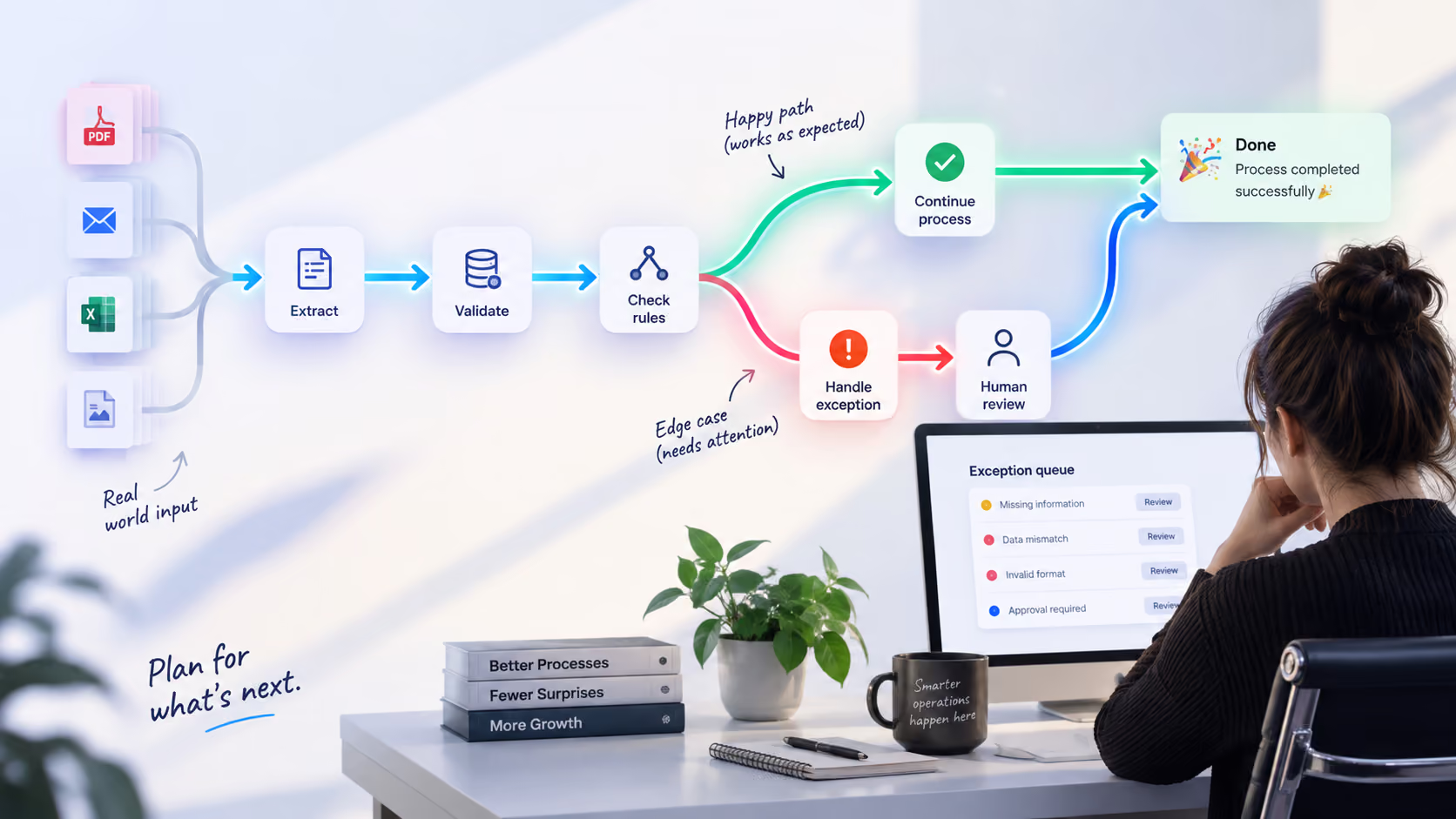
AI agents can classify emails, extract data from PDFs, summarize conversations, draft replies, and route requests. Atomic Actions offers AI agent development to connect agents with business tools and workflows. Keep a human in the loop for payments, contract changes, sensitive customer communication, legal or medical topics, and decisions with high error costs. Validate AI output before it updates important records.
For local service providers, AI automation for local businesses can help sort incoming inquiries, extract customer details, and direct requests to the right team member. For example, a salon could categorize booking requests, while a contractor could route estimated inquiries to the relevant employee.
Local Business Automation
Local business automation can prevent lost bookings and delayed quotes by connecting calls, scheduling, follow-up, and customer records.
For contractors, a missed call can trigger an SMS, create a lead, collect project details, and schedule a site visit. As construction companies grow, they may need to connect their CRM with project management and financial systems to keep sales, job progress, and invoicing aligned. Restaurants can use automation to connect inventory management, staff training, and daily operations.
AI automation for local businesses can classify routine inquiries, but staff should handle clinical decisions, complaints, and sensitive data. Clinics need access controls and secure reminders. AI automation for local businesses should keep those safeguards in place.
Choosing the Right Stack
Choose tools based on volume, technical skill, data sensitivity, and the systems that must connect. Automation for small business owners should fit the team's ability to maintain it.
A typical stack connects website forms to a CRM, uses Make or Zapier to move data, keeps financial records in QuickBooks, tracks jobs in Airtable, and presents key metrics in a dashboard. For tailored reporting, custom apps and reporting dashboards can combine sales, operations, and finance.
The right automation setup depends on the complexity of your workflows, the tools you already use, and the results you want to achieve. Some businesses can start with simple no-code integrations, while others need custom systems and reporting dashboards. Atomic Actions helps businesses identify operational bottlenecks, map workflows, and track performance through its business optimization and analytics services.
Cost and ROI
Budget for subscriptions, implementation, testing, AI usage, maintenance, and staff training.
Simple ROI example
For a fuller framework, see how to calculate automation ROI. Include the implementation fee, subscriptions, support, training, and the cost of exceptions, not just the headline savings.
Assume a five-person service business spends 25 hours per week on manual lead follow-up, quote preparation, invoicing, and data entry. At a fully loaded labor cost of $30 per hour, the process costs about $3,250 per month (25 × $30 × 52 ÷ 12).
An automation project costs $4,000 to implement and $250 per month to run. It removes 70% of the manual work, saving 17.5 hours per week, or about $2,275 per month.
Monthly gross labor capacity recovered: $2,275. After the $250 monthly operating cost, net monthly benefit is $2,025. Simple payback is $4,000 ÷ $2,025 = about two months.
Recovered hours create cash value only when redeployed productively; otherwise, count them as capacity gained. For a first-year view, compare $4,000 implementation + $3,000 running costs with $27,300 in estimated annual gross benefit. Net benefit is $20,300, or about 290% of the $7,000 first-year cost. These are illustrative estimates, not a guaranteed result. Measure recovered hours, response time, errors, conversion, and cash collection.
Atomic Actions currently publishes an average ROI payback of under four months and a typical deployment window of three to six weeks. These are company-reported benchmarks, not guarantees, validate them against project scope and ongoing costs.
Common Mistakes and Reliability
Automation projects often fail because the process is unclear, data is unreliable, or nobody owns the workflow after launch.
- Automating chaos: If the process changes every time, define the standard version first.
- Too many tools: Each app adds another connection and failure point.
- No single source of truth: Decide which system owns each record.
- Ignoring edge cases: Test missing fields, duplicates, refunds, cancellations, and unusual requests.
- No recovery path: Decide what happens after a timeout, expired credential, or API outage. Retry temporary failures with limits, send permanent failures to an exception queue, and alert the owner.
- Duplicate actions: Give each event or transaction a unique ID and check whether it has already been processed before creating a second invoice, sending a message, or booking an appointment.
- Unverified AI output: Validate extracted totals, dates, account IDs, and required fields against rules. Route low-confidence results to a person instead of letting uncertain data move downstream.
- No monitoring: Alert on failed runs, missing records, and stalled deals.
- No process owner: Assign responsibility for exceptions and improvements.
- Over-automating judgment: Keep humans accountable for sensitive decisions.
Every workflow should have clear validation rules, error alerts, a named owner, and a documented manual fallback.
In-House or Hire a Specialist?
Simple CRM tasks and form-to-spreadsheet workflows can often be built in-house. Complex integrations, sensitive data, and exception handling may need a specialist. Small business automation services should include documentation, training, monitoring, and a clear handover.
What small business automation services should include
Services should cover discovery, implementation, and post-launch support.
- Process discovery, workflow mapping, and ROI assessment
- Tool selection and CRM/data cleanup
- Workflow build, testing, and deployment
- AI approval rules, dashboards, and reporting
- Documentation, training, monitoring, and maintenance
Good small business automation services start by finding where time, revenue, and errors are lost, not by selling a tool.
30/60/90-day implementation plan
This sequence proves one workflow before SME automation expands.
.png)
How to Measure Results
Measure business outcomes, not the number of automations launched.
- Hours saved per week by role
- Lead response time
- Conversion, quote turnaround, and payment collection
- Missed-call recovery and no-show rates
- Customer satisfaction, errors, and rework
- Revenue per employee
Start with a baseline before implementation. If lead response time is currently four hours, target one hour. If invoicing takes three days, target same-day issuance. Clear baselines make ROI credible.
Conclusion: Where to Start
Successful automation starts with a clear understanding of how work gets done and where delays, errors, and missed opportunities cost the business money. The goal is to build reliable workflows that support growth, improve visibility, and give employees more time for meaningful work.
Effective small business automation solutions should fit the company's actual needs and deliver measurable results. Whether you want to automate small business tasks such as lead follow-ups and invoicing or develop a broader small business process automation strategy, the right approach depends on your processes, existing tools, and long-term goals.
If you're ready to identify bottlenecks and build a more connected operation, Atomic Actions can help you assess your workflows, choose the right automation approach, and turn disconnected tools into a system that supports your business as it grows. Explore our business optimization and analytics services to find opportunities for improvement and make your next automation investment count.
FAQ
What is small business automation?
Small business automation uses software, integrations, RPA, and AI to connect systems and handle repetitive tasks such as lead capture, invoicing, scheduling, document processing, and reporting.
What should a small business automate first?
Start with a frequent, rule-based process tied to revenue or cash flow, such as lead follow-up, quotes, appointment reminders, or invoices.
Is RPA still relevant with AI?
Yes. RPA is useful for repetitive, rules-based work, especially in older systems without APIs. Robotic process automation for small businesses can bridge these systems, but it still needs monitoring when interfaces change. AI is better for unstructured information such as emails, PDFs, customer messages, and documents. Many businesses combine both.
Can AI agents replace employees?
AI agents can classify, extract, summarize, draft, and route work. People should remain responsible for approvals, exceptions, and sensitive decisions.
How much does small business automation cost?
Costs depend on scope. Atomic Actions lists workflow automation from $800, AI agents from $1,000, dashboards from $1,500, CRM integration from $3,000, and custom control centers from $9,000. These are starting prices; confirm the scope and current quote with the provider.
How long does implementation take?
Simple automations can go live in days. A connected CRM, invoicing, and reporting workflow usually takes several weeks. Atomic Actions lists a typical three-to-six-week deployment window.
How do I know if automation is working?
Track hours saved, response time, conversion, error rate, collection time, and revenue per employee against a pre-launch baseline.
.png)
.avif)