Workflow Design for Edge Cases: Build Reliable Processes

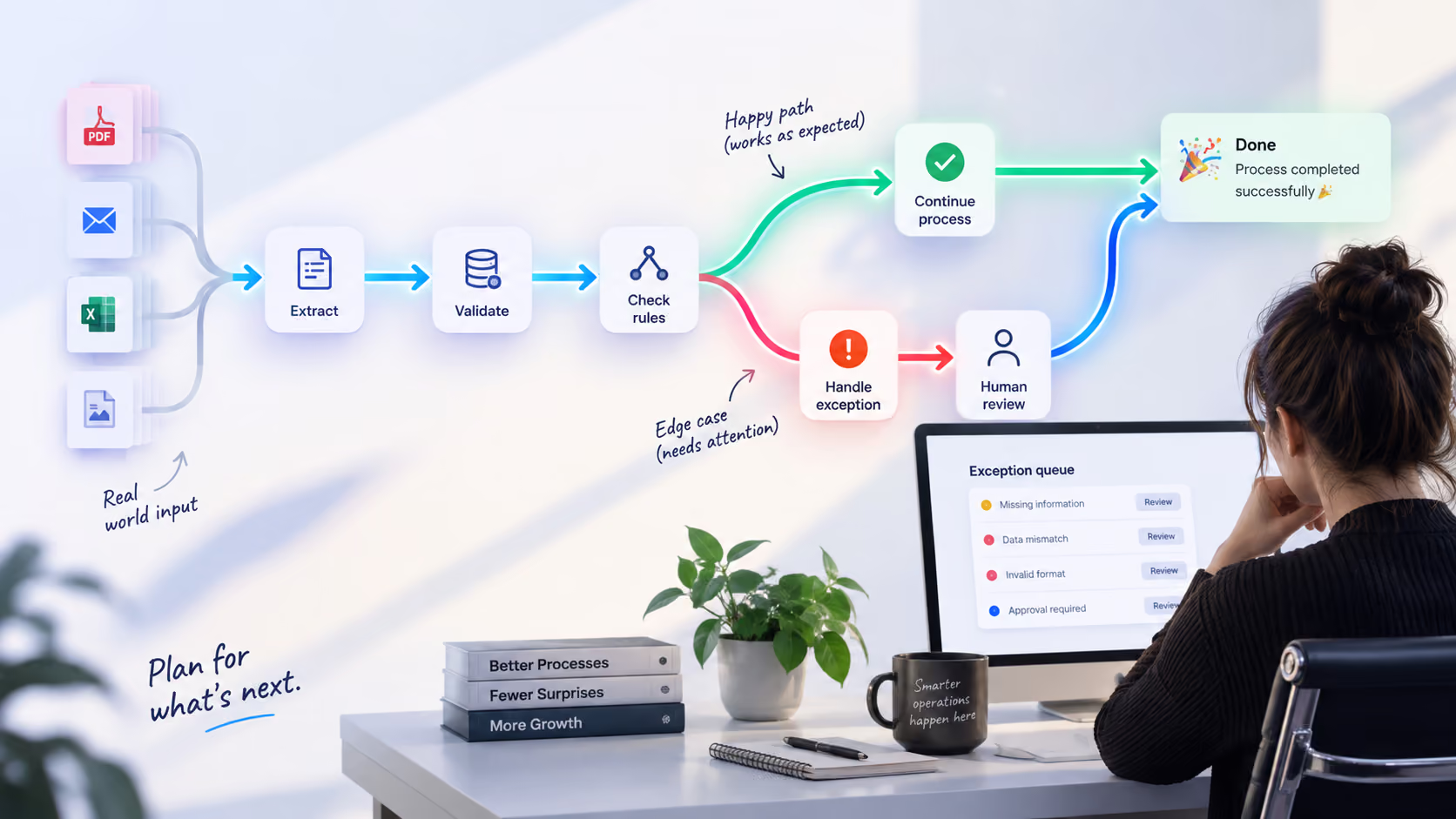
Most automation demos look perfect. The data is clean, inputs arrive in the expected format, every system responds on time, and users follow the process exactly as it was designed. Real work is rarely that tidy. An invoice arrives without a purchase order number. A customer skips a required step. Two systems contain different information about the same record. An API times out halfway through a transaction. A document comes in a format nobody included in the original requirements.
These are edge cases, but they are not necessarily rare events. In many business processes, they make up a meaningful part of day-to-day work. This is where workflow design becomes more important than simply connecting a few tools. A reliable workflow needs to account for what happens when the expected path stops being available. It needs clear workflow rules, conditional workflows, escalation paths, human review, and a way to recover from failures without forcing someone to rebuild the process manually.
Research into AI and automation deployments shows why this matters. Estimates suggest that 80–95% of AI pilots never reach sustained production, while Gartner has warned that by 2027, 40% of enterprises could demote or decommission autonomous AI agents because of governance gaps discovered after production incidents. Gartner's recommendation is particularly relevant to workflow architecture: autonomous systems need appropriate guardrails, monitoring, rollback mechanisms, and clear ownership.
The lesson for workflow design is straightforward. A process is finished when the organization knows what should happen when the happy path stops working.
.avif)
The Hidden Cost of Ignoring Edge Cases
The process shown in an onboarding document is rarely identical to the process people actually follow. Employees send Slack messages when required information is missing. Managers reopen tickets to add context that the original form did not capture. Finance teams maintain side spreadsheets for invoices with unusual payment terms. Operations teams keep lists of manual exceptions because the main system has nowhere to record them.
These workarounds are often signs of process inefficiencies and hidden workflow bottlenecks. They may not appear in the official process map, but they still consume time and create dependencies between people and systems.
Invoice processing provides a useful example. Industry benchmarks cited in automation research put invoice exceptions at around 20–22% of invoices processed, with issues including coding errors, missing information, purchase order mismatches, duplicate invoices, and non-standard payment terms.
That means a workflow can automate most invoice processing and still leave roughly one in five invoices requiring some form of exception management.
Deloitte's research on intelligent automation has estimated potential cost reductions of 25–50% in back-office functions where automation is fully deployed. At the same time, exception handling remains one of the areas where manual work tends to persist. The reason is simple: routine transactions are relatively easy to standardize, while unusual cases often require additional context or judgment.
McKinsey has found a similar pattern in procurement. Its research suggests that AI agents and other digital tools could make procurement functions 25–40% more efficient, while routine purchasing activities remain particularly suitable for automation. The opportunity is significant, but realizing it requires more than automating individual tasks. The surrounding business process design has to support the new way of working.
When exceptions are not designed into the process, they become invisible operational debt. They accumulate in inboxes, spreadsheets, ticket queues, and private messages. Cycle times increase, reporting becomes less reliable, and employees spend more time fixing the workflow than using it.
Start With Process Design, Not the Automation Tool
The first step in process design is understanding what actually happens. That means talking to the people who perform the work every day and looking for the places where the documented process stops matching reality. Which fields are frequently missing? Which approvals get stuck? Which documents arrive in unexpected formats? Where do employees manually correct data? Which cases are regularly taken out of the automated workflow?
These details reveal the real process complexity and the process dependencies that need to be considered before automation begins. A simple invoice workflow might look like this:
Receive PDF → extract fields → create invoice
The real workflow is usually closer to:
Receive PDF → identify vendor → extract fields → validate data → match purchase order → check payment terms → resolve missing information → approve → create invoice
Every additional step creates another place where the process can encounter an exception.
A manufacturing example
A food production company was processing laboratory reports manually. PDFs arrived from different labs and scanners, formats varied, some reports contained multiple product probes, and QA teams had to copy the results into spreadsheets by hand.
Atomic Actions built a workflow automation system that reads incoming reports, uses OpenAI to extract and categorize results, applies dynamic product mappings, and routes unusual or low-confidence cases for review. Scanned documents are handled through OCR, while QA managers can update mappings themselves without developer help.
The result: report processing dropped from around 15 minutes to less than one minute, parsing accuracy exceeded 90%, and more than 90% of manual data entry was eliminated.
The workflow architecture was built around real-world variability, including different report formats, changing product mappings, multiple probes, and documents requiring human review.
Classify Edge Cases Before You Automate Them
Once the real workflow is mapped, the next step is to organize its exceptions. Not every edge case needs the same response. A missing field, a policy violation, and a system integration failure may all interrupt the same workflow, but they require different actions. A useful exception taxonomy includes four common categories.
Missing inputs
The workflow is waiting for information it needs to continue. Examples include:
- missing purchase order numbers;
- incomplete customer records;
- missing attachments;
- absent approvals;
- incomplete forms.
The workflow should identify what is missing and route the case to the person or system responsible for providing it.
Policy conflicts
The data is complete, but the case falls outside the rules defined for the process. A payment may exceed an approval threshold. A discount may fall outside the permitted range. A customer request may require an exception to company policy. These cases need workflow escalation rather than another attempt to run the same automated rule.
System conflicts
Different systems disagree about the same information. A CRM may show one customer status while the ERP shows another. An order may appear as completed in one system but remain open in another. These situations are particularly important in workflow orchestration because the automation is coordinating multiple systems with different states and dependencies. The workflow needs to identify the conflict, preserve the relevant context, and define which system or person has authority to resolve it.
Low-confidence outcomes
AI or rules-based automation reaches a result but cannot be sufficiently confident that the result is correct. This is where human in the loop automation becomes useful. Instead of forcing the system to make a decision it cannot reliably make, the workflow can pause and route the case to a person with the information needed to review it.
Classifying edge cases this way turns exception management into part of the process architecture. Each type can have its own workflow rules, owner, escalation path, and resolution target.
Design the Exception Path Alongside the Main Workflow
A workflow should have a clear route for cases that do not match the expected conditions. One practical approach is a catch bucket: a review queue where unusual cases can wait until someone can resolve them.
Imagine an invoice workflow that normally extracts the vendor, invoice number, amount, and PO number. If the PO number is present and the invoice matches the purchase order, the process continues automatically. If the PO number is missing, the invoice moves to an exception queue. The system attaches everything it has already extracted, identifies the missing field, and assigns the case to the appropriate person. Once the employee provides the missing information, the invoice can return to the main workflow.
This is an important part of workflow management. The person handling the exception should not have to start over. The automated process should preserve the state of the case and make it clear what needs to happen next. Over time, the exception queue also becomes a source of information for workflow optimization.
.avif)
If the same exception appears hundreds of times, there may be an opportunity to automate it. If invoices regularly arrive without a PO number, the better solution might be to improve the upstream purchasing process. If an exception happens once a year, keeping it as a manual step may be more sensible. The goal is to build scalable processes that can absorb unusual cases without losing control of the overall process.
Human in the Loop Automation
Some process decisions require context that is difficult to encode in a rule. This is where a human in the loop can be part of the workflow architecture rather than an emergency fallback.
An AI system can classify documents, extract information, check conditions, and prepare a recommendation. When confidence is low or a decision has a higher business impact, the workflow can escalate the case to a person. The human receives the relevant information, makes the decision, and the workflow continues from that point.
.avif)
This approach is particularly useful for AI agents operating across multiple systems. Gartner's 2026 research on AI agent governance emphasizes the need for continuous monitoring, clear ownership, approval workflows, audit trails, and rapid rollback mechanisms as autonomy increases. Human review therefore does not have to mean abandoning automation. It can be one of the defined stages in a process orchestration model. The important part is designing the handoff properly.
A good escalation should answer:
- Why was the case escalated?
- What information did the system use?
- What decision does the person need to make?
- What happens after the decision?
- Where does the workflow resume?
Atomic Actions applies this approach in its AI Agents and Robotic Process Automation work, where automated steps and human checkpoints can be combined within the same process.
Build Workflow Monitoring Into the Architecture
A workflow can fail for reasons that have nothing to do with the business logic. A workflow can be interrupted by a temporary API outage, expired credentials, a rejected request from a downstream service, or a failure partway through a multi-step process. This is where workflow monitoring and automation monitoring become essential. A production workflow should be able to answer questions such as:
- Did the process start?
- Which steps have been completed?
- Where did it stop?
- Was the failure temporary?
- Should the step be retried?
- Did the previous system already receive the data?
- Does the case need reconciliation?
- Who needs to investigate it?
For transient technical failures, retry mechanisms can often provide automation recovery without human intervention. For more serious failures, the workflow needs a clear escalation path. This distinction matters because technical failures and business exceptions require different responses: an API timeout can trigger a retry, a missing approval can trigger human review, and a system mismatch can trigger reconciliation. Without structured logging, trace IDs, alerts, and reconciliation checks, these situations can become invisible until somebody notices that work has stopped.
Gartner's recent guidance on autonomous AI agents makes the same point at a larger scale: systems operating with greater autonomy need continuous monitoring, clear ownership, guardrails, and mechanisms that can stop or roll back actions when predefined thresholds are exceeded.
Test What Happens When Things Go Wrong
Workflow automation testing should cover much more than the standard successful scenario. A proper test plan should examine normal inputs alongside edge cases, permission problems, duplicate events, integration failures, partial completion, delays, and recovery scenarios.
Traditional user acceptance testing often covers only a limited portion of the unusual situations a production workflow will eventually encounter. Scenario generation and more systematic testing can expand that coverage before launch. An edge-case-first testing checklist can include:
- Use representative data from real recent work, including unusual cases.
- Test approvals, rejections, conditional workflows, alternate paths, and delays.
- Simulate missing data, duplicate events, unavailable systems, and expired credentials.
- Test partial completion, rollback, and recovery.
- Check how low-confidence AI decisions are escalated for human review.
- Verify monitoring, alerts, and ownership with the actual process owners.
The last point is especially important. A workflow can technically detect an error and still have poor process reliability if nobody is responsible for responding to it.
Find and Remove Workflow Bottlenecks
Once a workflow is running, its exception data can reveal where the process needs improvement. Suppose 30% of customer requests are escalated because one field is missing. The problem may not be automation. The form itself may be poorly designed.
If approvals regularly sit untouched for two days, the bottleneck may be the approval structure. If records frequently fail because two systems contain different customer information, the issue may be a broader data synchronization problem. This is why workflow optimization should continue after launch.
Exception data can reveal:
- recurring workflow bottlenecks;
- operational bottlenecks;
- unnecessary approval steps;
- poorly defined workflow rules;
- weak process standardization;
- unreliable system dependencies;
- repeated manual corrections.
Instead of treating every exception as an isolated incident, teams can look for patterns and fix the underlying process. That creates a useful feedback loop between workflow management and process optimization.
Build Automation in Waves
Reliable automation usually develops over time rather than arriving fully formed in one launch. A practical approach is to work in three waves.
Wave 1: Map and stabilize
Start with the real process. Identify the most common failure points and process inefficiencies, then automate the stable parts and create clear exception paths for the rest. The goal is to improve visibility and reliability while making it clear when human intervention is needed.
Wave 2: Reduce exception volume
Use workflow data to identify recurring problems and address them at the source. If a particular field is missing in 20% of cases, improve how that information is collected. If a particular approval is constantly delayed, review the approval process and remove unnecessary bottlenecks. If two systems repeatedly disagree, fix the underlying integration or data problem. Process standardization and optimization should gradually reduce the number of exceptions the workflow needs to handle.
Wave 3: Expand and optimize
Once the workflow is stable, increase automation coverage, improve performance, and prepare for higher volumes. As more systems and automated actions are added, strengthen workflow orchestration, dependencies, conditions, escalation, monitoring, and recovery. This creates a scalable process that can handle greater complexity without sacrificing reliability.
Designing for Exceptions Makes Processes More Reliable
A reliable workflow is built around what actually happens in day-to-day operations, including missing data, unexpected inputs, system failures, and cases that require human judgment. Good workflow design gives each of these situations a clear path, with the right rules, ownership, escalation, monitoring, and recovery mechanisms in place.
This starts with understanding the real process. Map how work moves across people and systems, identify the most common edge cases and workflow bottlenecks, and define what should happen when the standard path cannot continue. From there, you can build automation that supports the process without creating new operational bottlenecks.
The result is a more reliable foundation for scalable processes: routine work moves automatically, exceptions stay visible, and teams have a clear way to resolve problems and keep work moving. If you are looking at an existing workflow and seeing too many manual workarounds, repeated exceptions, or processes that break as volume grows, Atomic Actions can help you identify where the friction comes from and design a more reliable way to run the work.
Ready to find the bottlenecks in your workflows? Book a complementary automation strategy session with Atomic Actions to explore where automation, process optimization, and better exception management can make the biggest difference.
FAQ
Why do automated workflows fail when something unexpected happens?
Automated workflows usually follow a set of predefined rules, so they can struggle when a request contains missing information, arrives in an unusual format, or doesn't match the expected pattern. Even a small exception can stop the entire process if there's no rule for handling it. Thinking through these situations before launch helps teams build workflows that can handle real-world problems.
How can you make sure a workflow doesn't process the same request twice?
A workflow should check whether a request has already been processed before starting the next step. For example, if a customer submits a form twice or a system retries a failed request, this check can prevent duplicate records, emails, or payments. It's also worth testing what happens when the same request arrives from different sources at nearly the same time.
What should you do when a workflow gets stuck?
First, find out where the process stopped and whether any steps were completed successfully. If it's safe to retry the failed step, the workflow can continue automatically; otherwise, someone should review the issue before anything else happens. Clear error messages and notifications make it easier to fix the problem without starting the whole process from scratch.
Should every workflow exception be automated?
No. It's usually better to automate exceptions that happen regularly and have a clear solution. Unusual cases that require judgment, extra context, or approval from a manager can be sent to a person instead. This keeps workflows manageable and avoids adding complicated rules for problems that rarely occur.
How do you know if a workflow is working reliably?
Look at how often the workflow finishes successfully, how many errors occur, and how much time people spend fixing problems manually. If the same exceptions keep coming up or employees regularly have to step in, the workflow may need improvement. Checking these numbers over time helps you see whether changes are actually making the process more reliable.
When should you redesign a workflow instead of adding more rules?
If a workflow keeps getting more complicated and every new exception requires another rule, it's worth taking a step back. The real problem might be an unclear process, missing information, or unnecessary steps rather than a lack of automation. Redesigning the workflow can make it easier to manage, update, and scale as the business grows.
.png)
.avif)
.png)
.avif)