AI Automation for Multi-Location Businesses: Practical Guide

.png)
Opening one location is an operational challenge. Running twenty or fifty becomes a data and workflow challenge. As the network grows, local workarounds lead to inconsistent processes, manual reporting, and limited visibility.
AI automation for multi-location businesses creates a connected operating layer that standardizes workflows, connects data, identifies exceptions, and helps managers act faster, without replacing every system the business already uses.
Why Operations Break When You Add More Locations
The first location often relies on informal knowledge: who to call, how much stock to order, who can cover a shift, and when to escalate an issue. As the network grows, this becomes harder to replicate. Common problems include:
- Different processes: locations handle the same tasks in different ways.
- Disconnected tools: POS, CRM, accounting, inventory, HR, and scheduling systems operate separately.
- Manual reporting: managers rely on spreadsheets to consolidate and share data.
- Dependence on managers: critical knowledge stays undocumented.
- Limited visibility: successful processes at one location are not easily shared across the network.
At five locations, these differences may be manageable. At fifty, they create hundreds of inconsistent actions every week. Scaling therefore requires common processes, consistent data, and connected systems — the foundation of multi-location business automation.
What Is Multi-Location Business Automation?
Multi-location business automation uses workflows, integrations, and decision logic to keep operations consistent across locations. The goal is to create a repeatable operating model with:
- common data definitions;
- consistent workflows;
- clear ownership and approvals;
- standardized KPIs;
- controlled local variations;
- centralized visibility into exceptions.
For example, basic automation alerts staff when stock is low. A more advanced multi-location process automation workflow can compare demand across locations, detect unusual consumption, suggest an inter-location transfer, and create an approval task.
Rule-Based Automation vs. AI Automation
Traditional rule-based automation works well when inputs and outcomes are predictable. Robotic process automation can handle repetitive tasks with clear rules and defined outcomes.
For example: When stock falls below X, create a purchase task.
Or: When an invoice is approved, send it to accounting.
These workflows are reliable because their logic is explicit. AI automation for multi-location businesses becomes useful when inputs vary and the system must interpret information before acting. AI can process documents, summarize reports, classify messages, detect patterns, and flag anomalies.
For example, AI can:
- extract data from invoices in different formats;
- summarize performance across locations;
- flag unusual labor or inventory patterns;
- classify customer reviews;
- identify recurring compliance issues.
This makes multi-location business automation useful for keeping core processes consistent while handling different inputs across locations.
.avif)
Corporate-Owned Networks vs. Franchise Networks
The operating model matters. Corporate-owned locations can usually follow standardized systems and workflows set by head office. Franchise networks are different: the franchisor controls the brand and core standards, while franchisees run individual businesses with their own tools and local priorities.
.avif)
This is why franchise operations automation needs a slightly different approach. The franchisor wants consistent standards and accurate reporting, while franchisees want tools that save time or improve local profitability. The strongest franchise workflow automation projects therefore begin with processes where both sides benefit.
The Central Hub: One Operational Layer Without Replacing Existing Systems
Most growing businesses already have a technology stack, but their systems were often added at different stages of growth. A location may use separate tools for POS, CRM, accounting, inventory, and HR. Replacing them all with one platform can be expensive and disruptive.
A Central Hub takes a different approach. It can combine integrations with custom apps and reporting dashboards to give leadership a consistent operational view. POS, CRM, accounting, warehouse, HR, and other tools can continue doing their specialized jobs while the hub standardizes the data and workflows that move between them.
The key is that employees should not have to enter the same information into five systems manually. Data can move between systems through APIs, webhooks, middleware, or other integrations. This creates a single operational view without requiring a complete technology replacement.
.avif)
Atomic Actions describes this type of approach through its Central Hub for growing businesses concept: connect operational information and workflows so the company can manage growth without creating another layer of disconnected tools.
The approach also connects with the broader idea of a business operating system. After individual workflows are automated, the next step is to connect them so that customer, operations, finance, reporting, and automation work as parts of the same operating environment.
Which Processes Should You Automate First?
The best starting point is usually a process that is frequent, repetitive, measurable, and expensive to manage manually.
Priority depends on the industry. Restaurants may start with inventory, waste, scheduling, and inspections; clinics with appointment utilization and no-shows; retail with stock balancing; and home services with lead response, dispatch, and invoicing. The key is to automate a network-wide problem, not an isolated task at one location.
AI Agents in Multi-Location Operations
Businesses can use AI agents development to add another layer of intelligence once core data and workflows are connected. A traditional workflow waits for a predefined trigger. An AI agent can collect information from several systems, interpret it in context, and prepare an action or recommendation.
For a regional manager, an AI agent could produce a daily operational briefing. It might:
- Collect sales, labor, inventory, staffing, compliance, and customer feedback data.
- Compare each location with its historical performance and network benchmarks.
- Identify unusual changes.
- Summarize the most important issues.
- Route tasks to the appropriate manager.
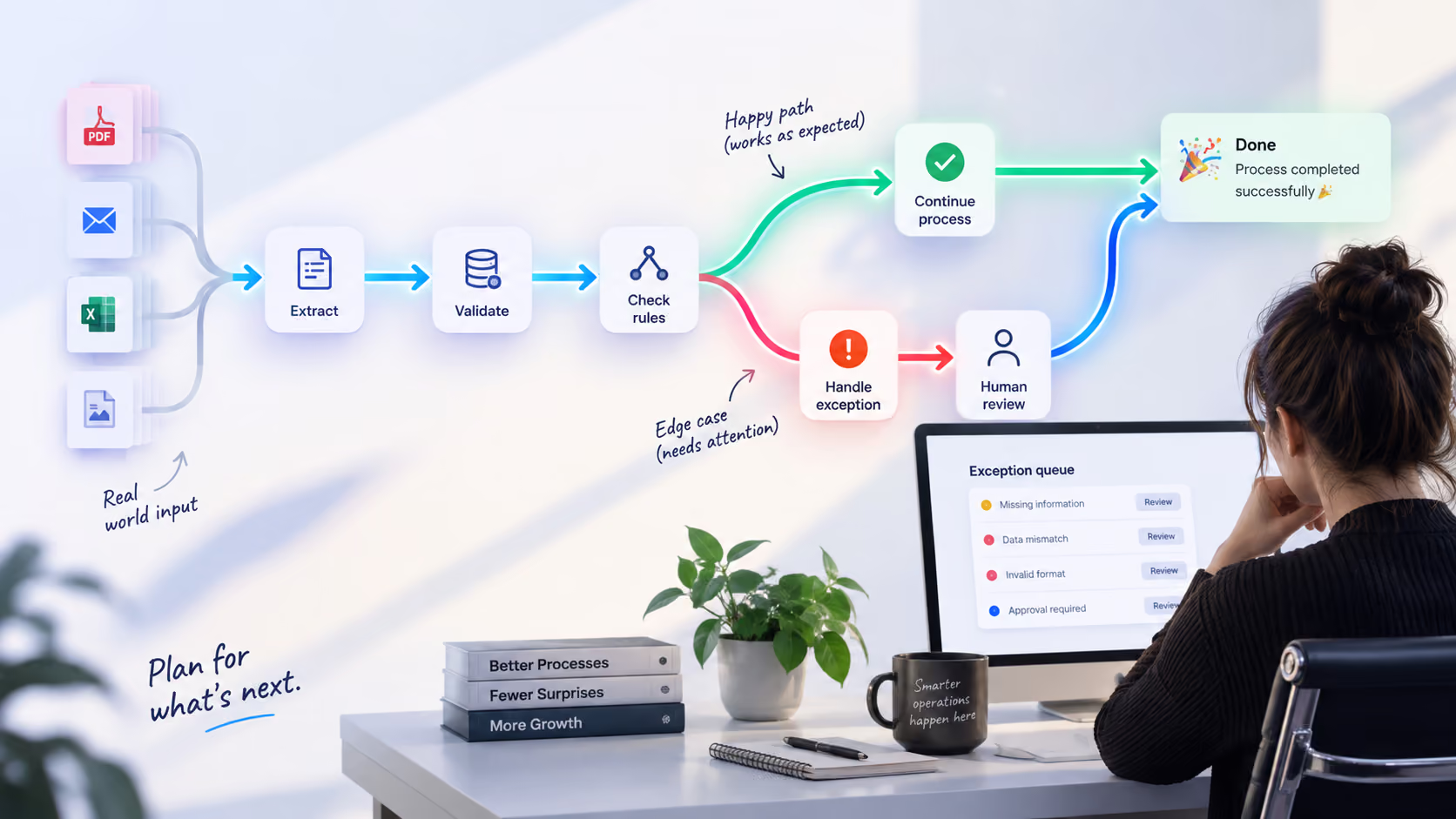
- Escalate high-priority exceptions for human review.
Typical AI agent use cases include:
- daily summaries for every location;
- cross-location anomaly detection;
- internal request classification and routing;
- SOP and policy question answering;
- inspection follow-up;
- review and reputation monitoring;
- recurring management reports;
- alerts when important KPIs move outside an expected range.
This is where AI automation for multi-location businesses can move beyond simple task automation toward operational decision support.
Where Human-in-the-Loop Is Necessary
AI should not automatically make every operational decision. Human approval is particularly useful for:
- significant financial transactions;
- unusual royalty calculations;
- employment-related decisions;
- sensitive customer complaints;
- regulatory or compliance interpretation;
- exceptions outside documented business rules.
The agent can gather information, identify the issue, prepare a recommendation, and route it to the right person. The manager remains responsible for the decision. This is also why workflow design needs to account for edge cases. A reliable automation should define what happens when information is missing, systems disagree, an exception falls outside the normal range, or a human needs to override the workflow.
Franchise Operations Automation: From Onboarding to Royalties
Franchise operations automation can streamline onboarding, brand standards, reporting, royalties, and adoption. Centralized workflows track access, training, documents, setup, equipment, and compliance, while automated reminders flag incomplete steps.
AI can analyze inspection forms, photos, and notes, summarize findings, and identify recurring issues. Reporting workflows can pull sales data, apply royalty rules, flag discrepancies, and prepare reports for review.
Starting with review management, lead distribution, reporting, scheduling, or compliance reminders helps remove administrative work without adding another platform. This makes franchise workflow automation both an efficiency tool and a practical way to support franchisee adoption.
Industry Scenarios
The same architecture can support very different workflows depending on the business.
Restaurants
Restaurant networks can automate inventory forecasting, inter-location transfers, staff scheduling, waste reporting, inspections, and review management. A Central Hub can combine POS, inventory, staff, training, and operational data into one view. See our restaurant operations platform for multi-location management case study for an example of how inventory, staff training, and operational management can be connected across locations.
Clinics
Clinics can use automation for appointment reminders, waitlist management, patient communication, documentation, staff scheduling, and billing workflows. AI can also help process incoming documents and route requests to the right team.
Retail
Retail chains can automate stock rebalancing, store-to-store transfers, reorder recommendations, promotion reporting, and compliance checks. A network-wide view makes it easier to identify why one store has excess inventory while another has repeated stockouts.
Fitness Studios
Fitness businesses can automate trial follow-up, membership communication, class scheduling, staff coverage, and retention workflows. AI can summarize location-level performance and identify studios with unusual drops in attendance or conversion.
Home Services
Home-services networks can use automation for lead response, job scheduling, dispatch, estimates, invoicing, and review requests. The biggest opportunity is often the connection between customer acquisition and field operations: a lead arrives, gets qualified, is routed to the right location, receives an appointment, and continues through the workflow without repeated manual entry.
Cost and ROI: What Can 5, 20, or 50 Locations Look Like?
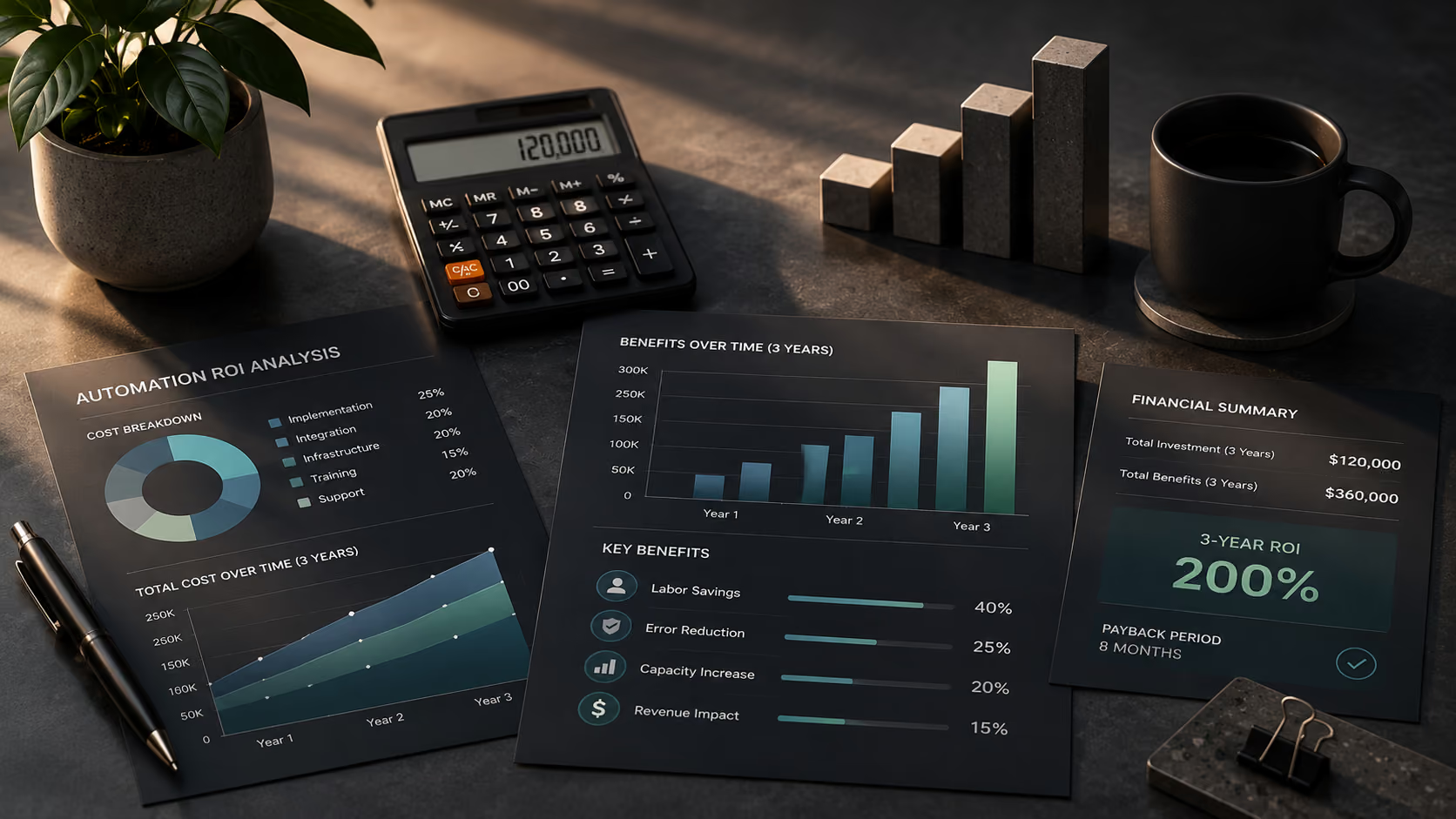
The ROI of multi-location process automation comes from multiplying improvements across the network. The calculation should include three main sources of value:
- labor and administrative savings;
- incremental gross profit from better conversion, utilization, or retention;
- avoided costs from fewer errors, missed tasks, compliance problems, and manual reconciliation.
Consider this illustrative planning model:
These figures are illustrative, not guaranteed outcomes. A real business case should use actual labor rates, transaction volumes, revenue, error rates, implementation costs, and expected revenue impact.
For example, 20 hours of administrative work per month at each location means 100 hours across five locations and 400 across twenty. That is the scaling effect.
A simple ROI model is:
Monthly net benefit = labor savings + incremental gross profit + avoided costs − recurring automation costs
And:
Payback period = one-time implementation cost ÷ monthly net benefit
For a 20-location network in the example above:
$30,000 ÷ $11,000 = approximately 2.7 months.
The important point is not the exact number. It is the method. The business should calculate ROI from measurable operational improvements rather than from the number of AI features purchased.
Implementation Plan: From One Location to the Whole Network
Successful multi-location business automation usually follows a phased rollout.
1. Audit current operations
Start with operational discovery before automation. Map how the process works at several locations, not just how the SOP says it should work.
Look for:
- different process versions;
- manual handoffs;
- duplicate data entry;
- spreadsheet dependencies;
- unclear ownership;
- missing information;
- recurring exceptions.
This step prevents the company from automating a process that is already broken.
2. Define the target workflow
Decide which parts must be standardized and which local variations are legitimate. Document triggers, owners, approvals, escalation paths, data requirements, and KPIs.
3. Pilot at one location
Choose one representative location and implement the workflow there. Measure the baseline before launch. Then compare the same KPIs after implementation. The pilot should be treated as a learning environment. If managers discover an exception that was not included in the original design, fix the workflow before scaling it.
4. Roll out in stages
Move from one location to a small group, then to the larger network.
For example:
1 location → 3–5 locations → 10–20 locations → full network
Each stage should include training, support, KPI tracking, and feedback.
5. Add AI after the workflow is stable
Once the underlying process and data are reliable, add AI capabilities such as document extraction, anomaly detection, summaries, recommendations, and AI agents. This sequence makes AI automation for multi-location businesses more reliable because AI is working on a defined operational foundation.
Common Mistakes to Avoid
Automating chaos
If every location records customers, products, or transactions differently, automation will reproduce the inconsistency faster. For example, if Location A defines an active customer differently from Location B, a centralized dashboard can technically combine the numbers while still producing a misleading comparison. Clean the process and the data model first.
Buying point solutions without an operating model
A network can easily end up with one automation for reviews, another for inventory, another for scheduling, and another for reporting. Each tool may work perfectly by itself while the overall operation becomes more fragmented. Start with the workflow and integration architecture, then choose the tools.
Ignoring dirty data
AI depends on the information it receives. Common problems include:
- duplicate customer records;
- inconsistent location names;
- missing product IDs;
- different KPI definitions;
- outdated employee records;
- incomplete transaction data.
Data extraction and recognition can help structure information from documents and other unstructured sources, but the network still needs clear data definitions and validation rules.
Over-customizing every location
Local variation is sometimes necessary. Unlimited variation destroys comparability. Keep the core workflow, definitions, and KPIs consistent while allowing controlled local differences.
Skipping change management
Even a technically strong workflow can fail if managers do not understand why it exists. Involve location teams during the pilot, show the time saved, and give managers a clear escalation path when something does not work as expected.
Metrics to Track Across Every Location
Once the network has standardized data and workflows, leadership can compare locations using a consistent scorecard. Core metrics can include:
- revenue and gross margin;
- labor cost as a percentage of revenue;
- stockout and inventory variance;
- waste;
- lead response and conversion;
- appointment utilization;
- no-show rate;
- customer rating;
- review response time;
- training completion;
- SOP compliance;
- inspection scores;
- invoice processing time;
- unresolved exceptions.
The exact metrics depend on the industry, but the definitions should remain consistent. This is where business optimization and analytics becomes valuable. Once the network can see the same metrics for every location, leadership can identify outliers, investigate causes, and prioritize improvements based on evidence.
Where to Start with AI Automation
The starting point for AI automation for multi-location businesses should be one process that is repeated across locations and creates measurable operational cost or risk. Inventory ordering, scheduling, reporting, onboarding, invoicing, and compliance are common candidates. Map the process across several locations, standardize it where possible, connect it through a Central Hub, and test it in one location.
From there, the pattern can be replicated. The long-term goal is a network where:
- routine work moves automatically;
- data is available without manual consolidation;
- managers focus on exceptions and decisions;
- successful processes can be replicated quickly;
- leadership can compare locations using consistent KPIs.
This is the real value of multi-location business automation, franchise operations automation, franchise workflow automation, and broader multi-location process automation: a connected operating model with consistent data, workflows, and controlled local variation.
Atomic Actions helps growing businesses turn that foundation into practical AI-powered workflows, integrations, and operational systems. If you’re ready to find the processes where automation can make the biggest impact, talk to Atomic Actions.
FAQ
Do we need to replace our existing POS, CRM, accounting, warehouse, or HR systems?
No. A Central Hub can connect existing systems and coordinate information between them. The objective is to integrate the current technology stack rather than force the company into a complete system replacement.
How is AI automation different from rule-based automation?
Rule-based automation follows predefined conditions. AI can interpret documents, messages, images, and operational patterns before deciding what information to surface or what action to recommend. This makes AI useful when processes contain variation and exceptions.
What should a multi-location business automate first?
Start with a high-volume process that is repeated across locations and has a measurable impact on labor, revenue, customer experience, or compliance. Inventory, scheduling, reporting, invoicing, onboarding, and inspections are common starting points.
How is franchise operations automation different from corporate-owned network automation?
Corporate-owned businesses can generally mandate common processes and systems. Franchise operations automation has to balance central brand standards with franchisee autonomy. The strongest workflows provide an obvious benefit to franchisees while giving the franchisor consistent reporting and visibility.
Should AI agents make operational decisions without human approval?
Only for low-risk actions with clear boundaries. Financial exceptions, employment decisions, sensitive customer situations, and unusual compliance cases should generally include human review. AI agents can prepare information and recommendations while people retain decision authority.
.avif)